How Odokai works

AI agents that gather information, draft, check and follow up, using the tools and data your team already has. A person approves anything that matters.

A workflow mid-run: each new support email is classified, then answered, drafted for your approval and sent, archived or passed to a person.

Plain English: what Odokai does and what it is like to use.

What it is

An agentic operating system for your business.

Odokai is a platform where your team builds, runs and governs AI agents, workflows and apps on your own data. Subscribe to it as a service on our shared platform, or have your own instance, managed in our cloud or yours.

Agents read the inbox, query the database, follow the way your team does things, and hand back finished work for a person to check, with no copying and pasting. Everyone starts with the Odokai Assistant. A job that keeps coming back gets a specialist agent of its own, shared with the whole team.

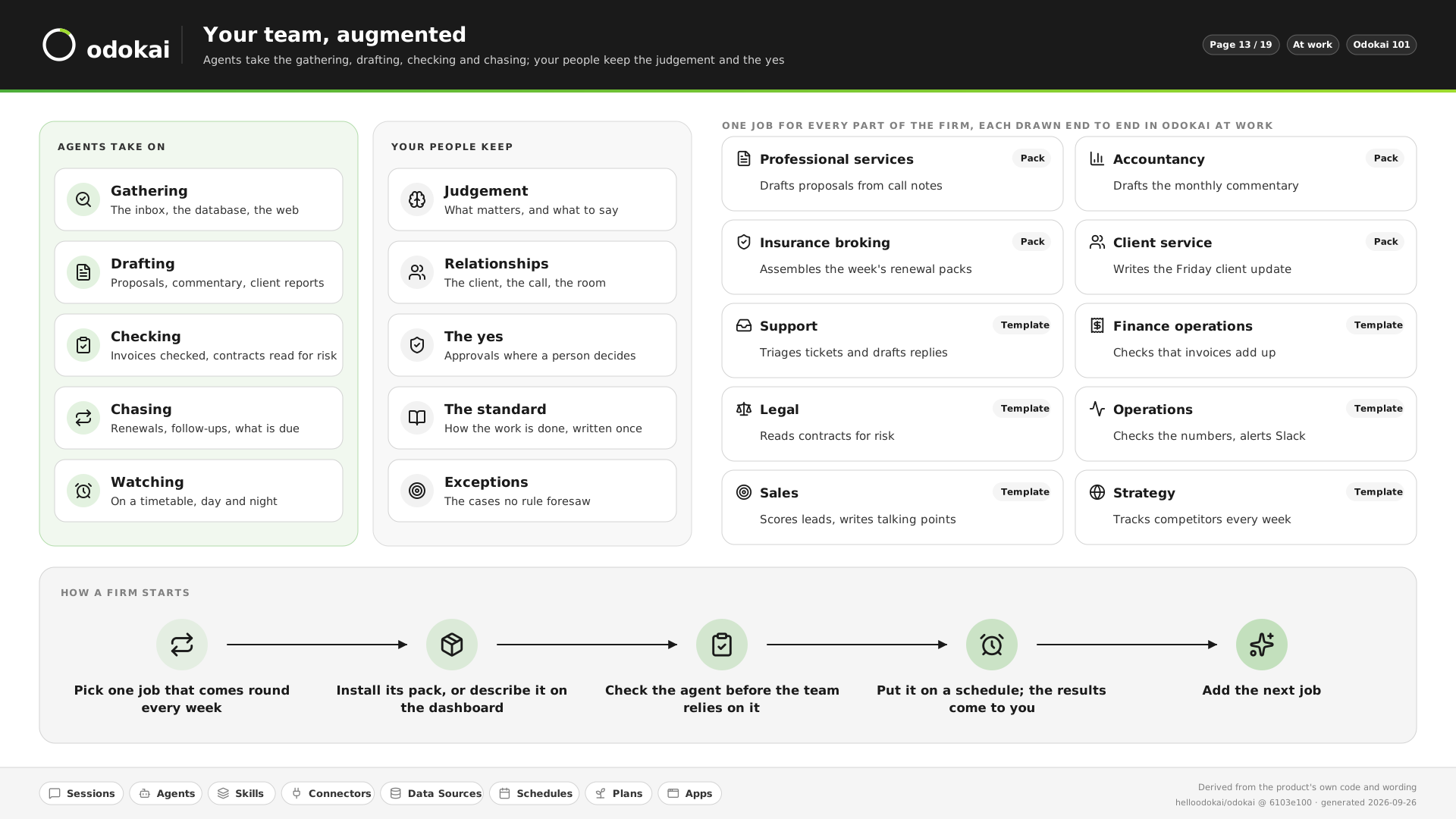
Agents take on

  • Gathering. The inbox, the database, the web.
  • Drafting. Proposals, commentary, client reports.
  • Checking. Invoices added up, contracts read for risk.
  • Chasing. Renewals, follow-ups, what is due.
  • Watching. On a timetable, day and night.

Your people keep

  • Judgement. What matters, and what to say.
  • Relationships. The client, the call, the room.
  • The yes. Approvals where a person decides.
  • The standard. How the work is done, written once.
  • Exceptions. The cases no rule foresaw.

See it in pictures

How it works

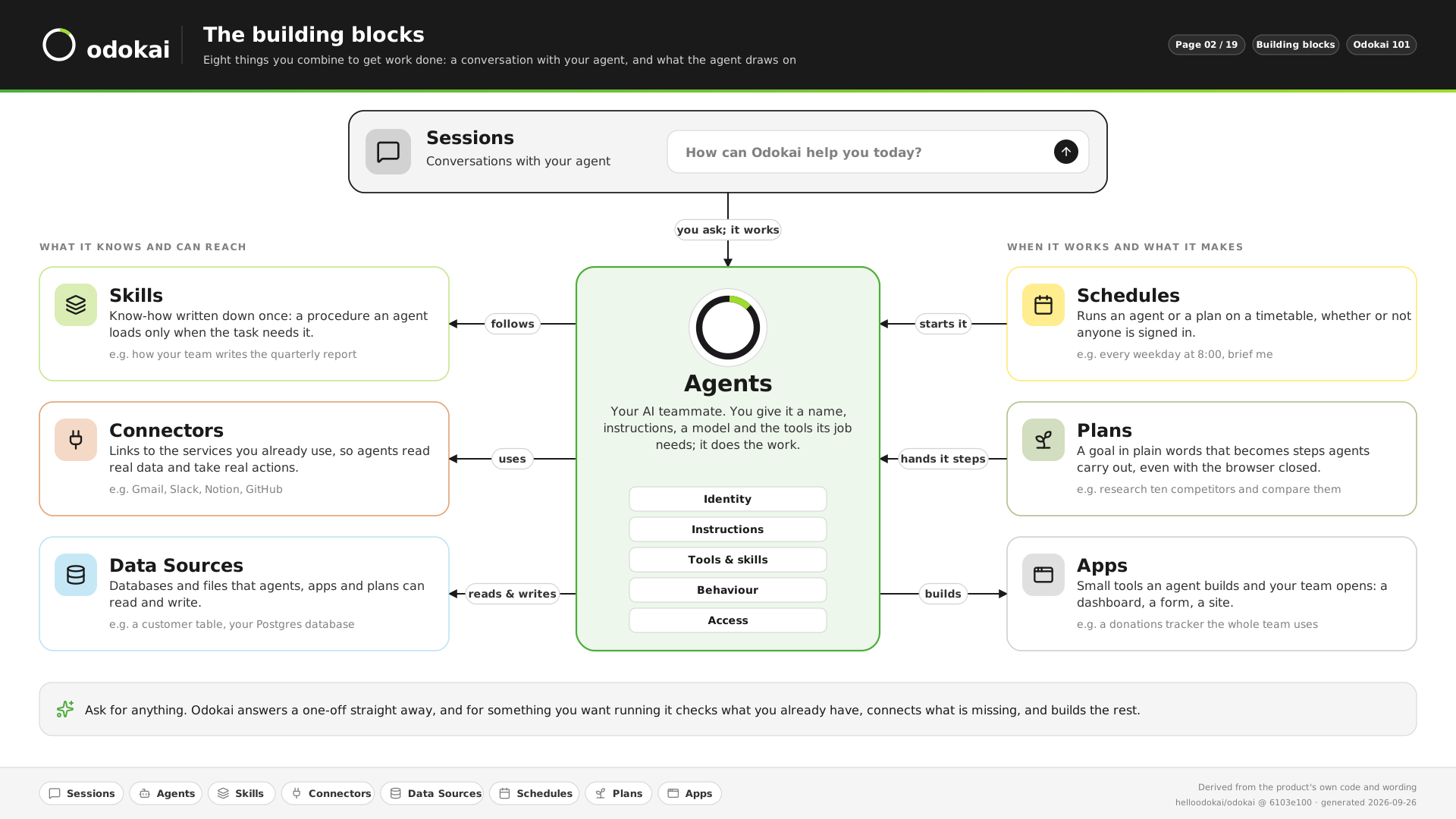
Eight building blocks.

Most work starts as a conversation with an agent. The other seven blocks add your processes, tools and data, and run work on a schedule.

One map of Odokai: you ask in a session, and the agent does the work. Skills are the know-how it follows, connectors the services it uses, and data sources the data it reads and writes. Schedules wake it on a timetable, plans hand it the steps of a bigger goal, and apps are what it builds for people to open.
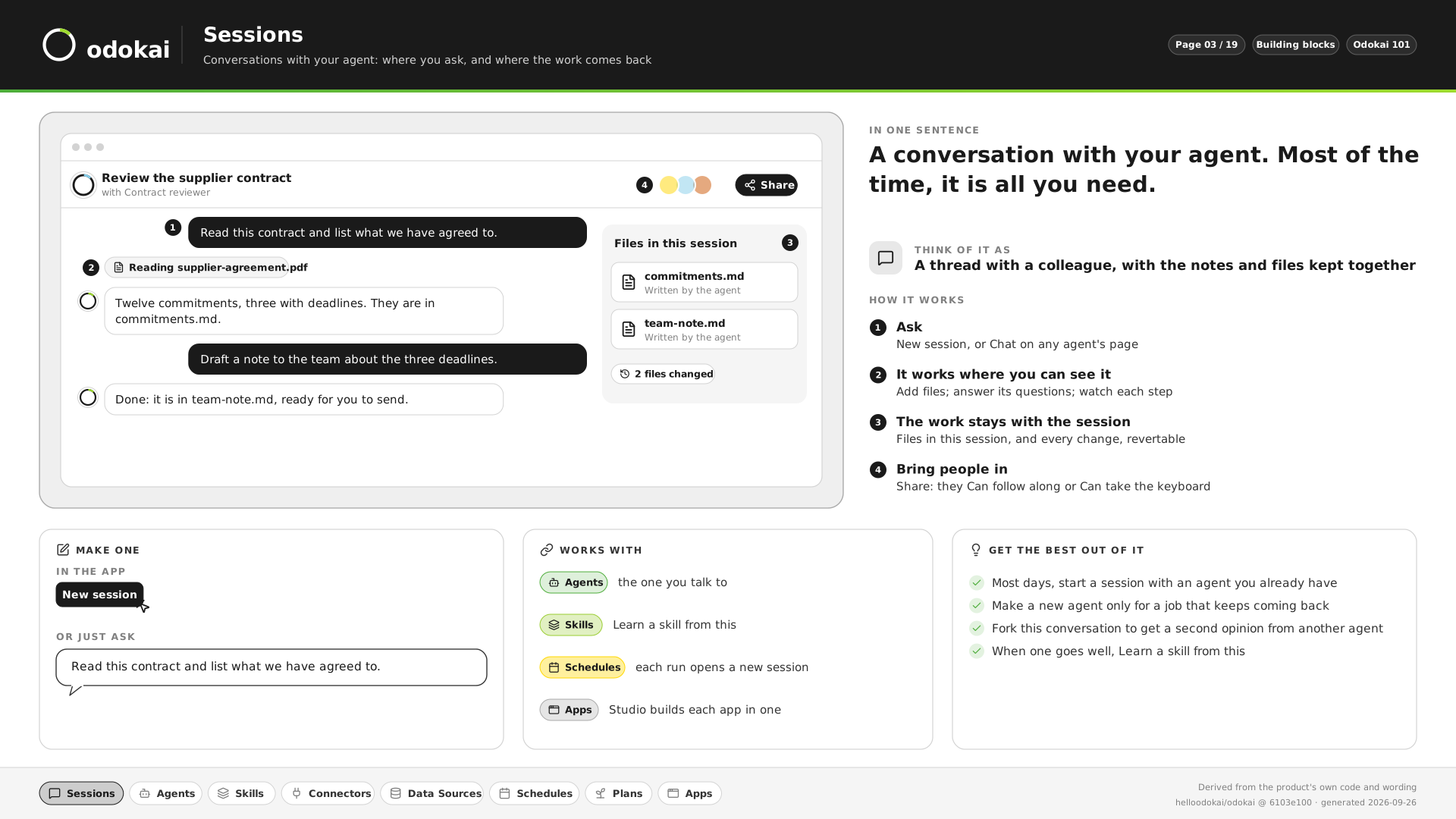
  1. Sessions

    A conversation with your agent, with its files kept alongside. Most of the time, it is all you need.

    “Read this contract and list what we have agreed to.”

    See it in pictures
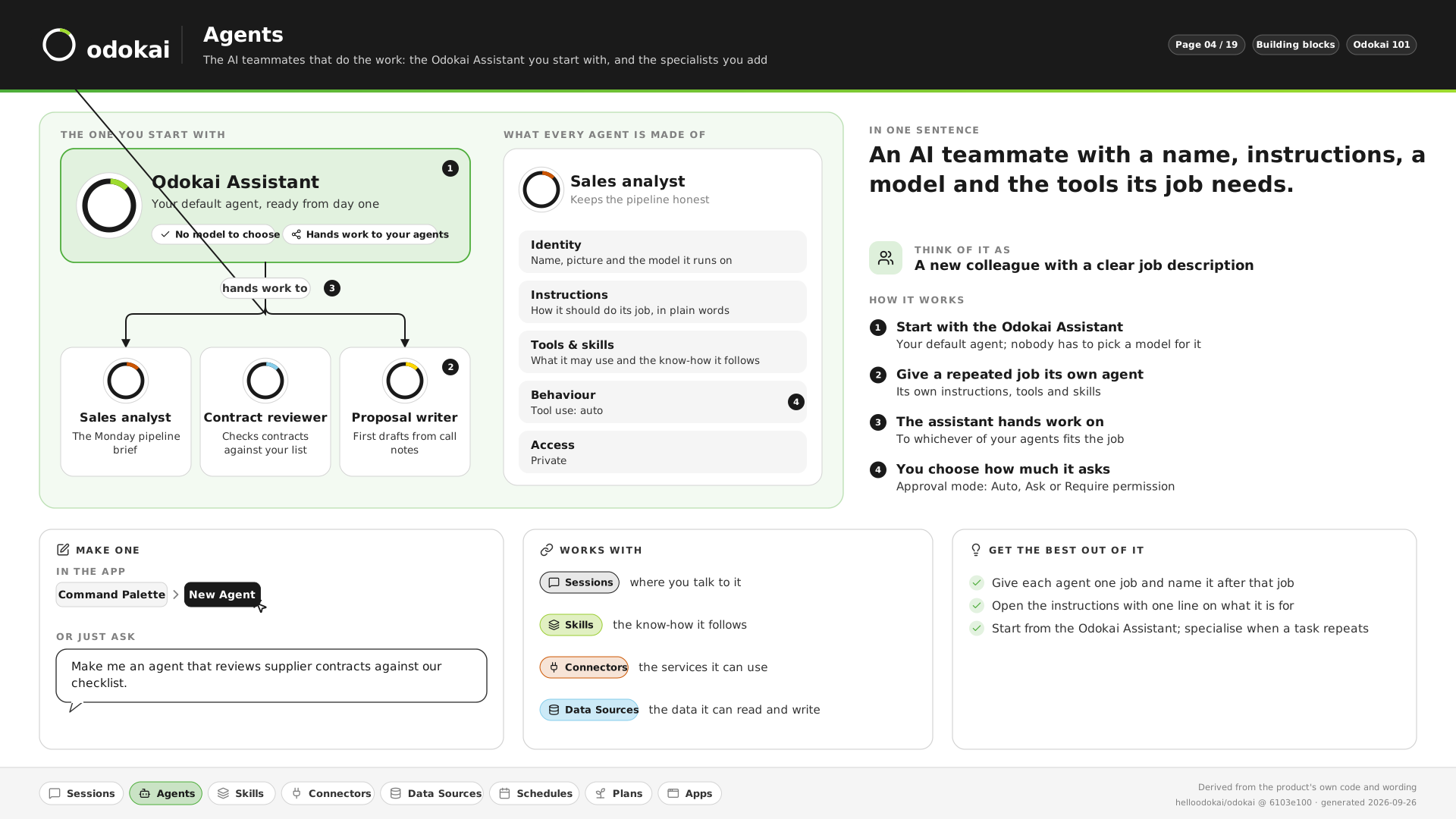
  2. Agents

    An AI teammate with a name, instructions, a model and the tools its job needs.

    “Make me an agent that reviews supplier contracts against our checklist.”

    See it in pictures
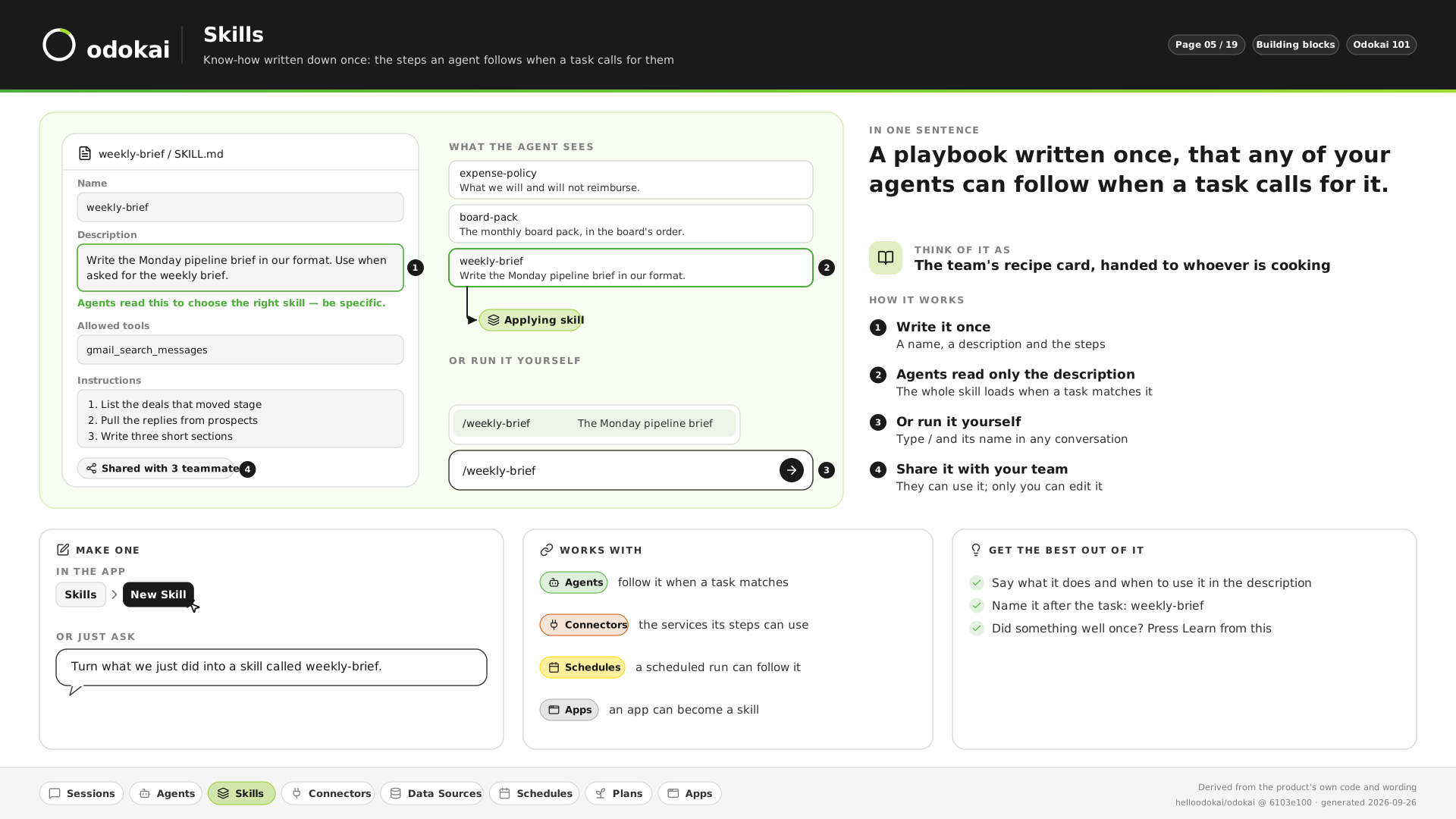
  3. Skills

    A playbook written once, that any of your agents follows when a task calls for it.

    “Turn what we just did into a skill called weekly-brief.”

    See it in pictures
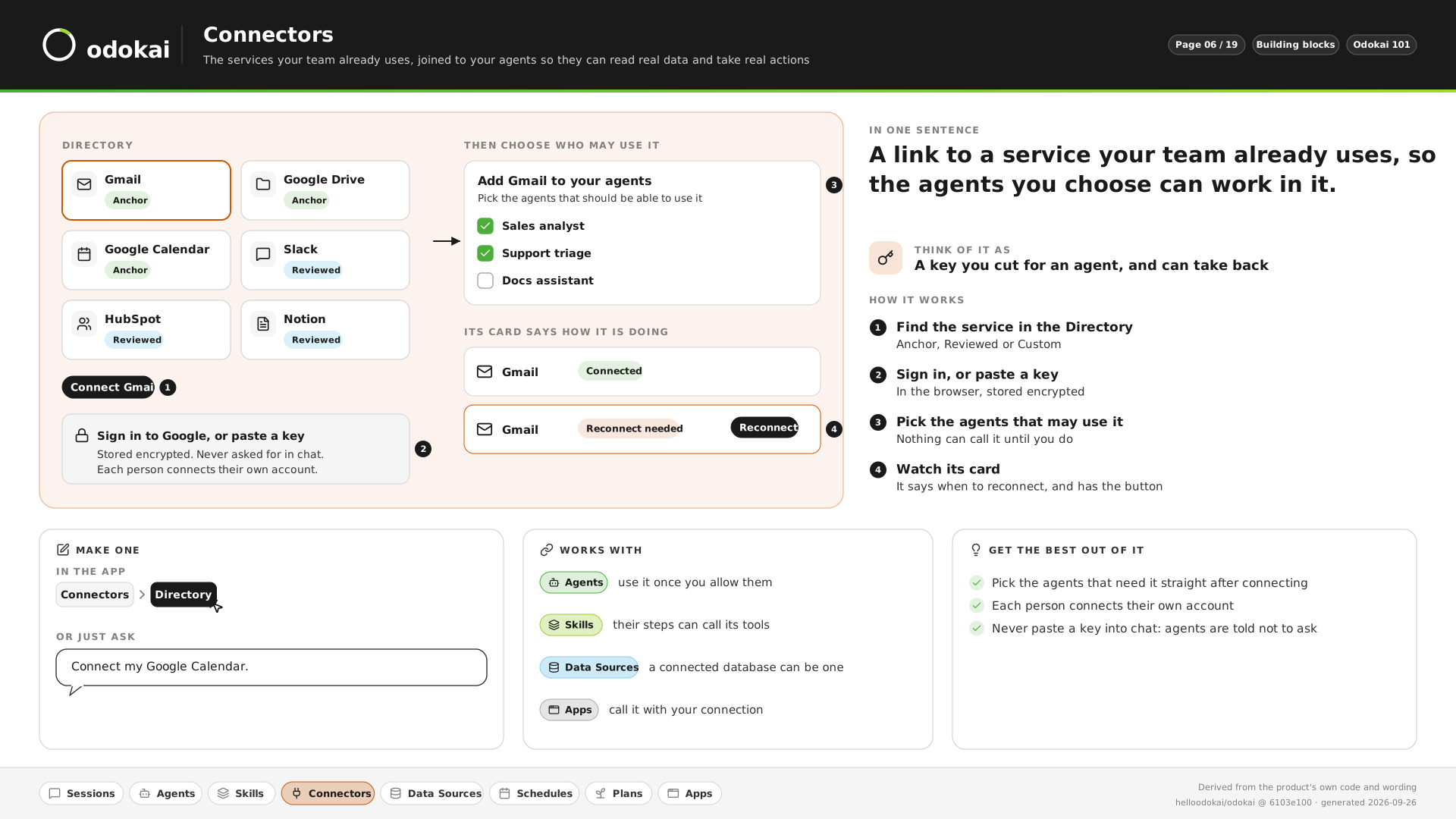
  4. Connectors

    A link to a service your team already uses, such as Gmail, Slack or HubSpot, so the agents you choose can work in it.

    “Connect my Google Calendar.”

    See it in pictures
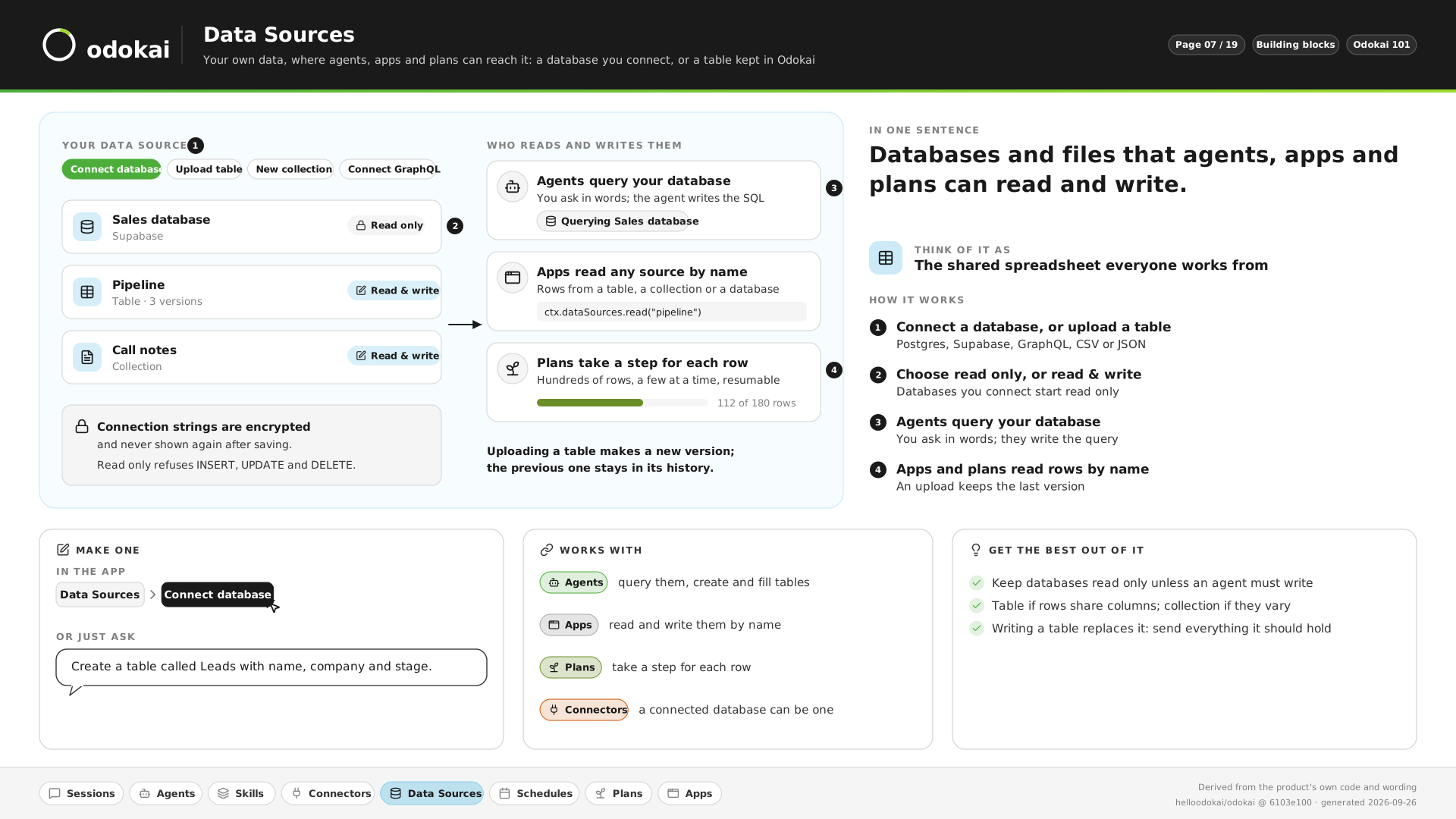
  5. Data Sources

    Your databases and tables, read only unless you say otherwise. You ask in words; the agent writes the query.

    “Which customers have not ordered in ninety days?”

    See it in pictures
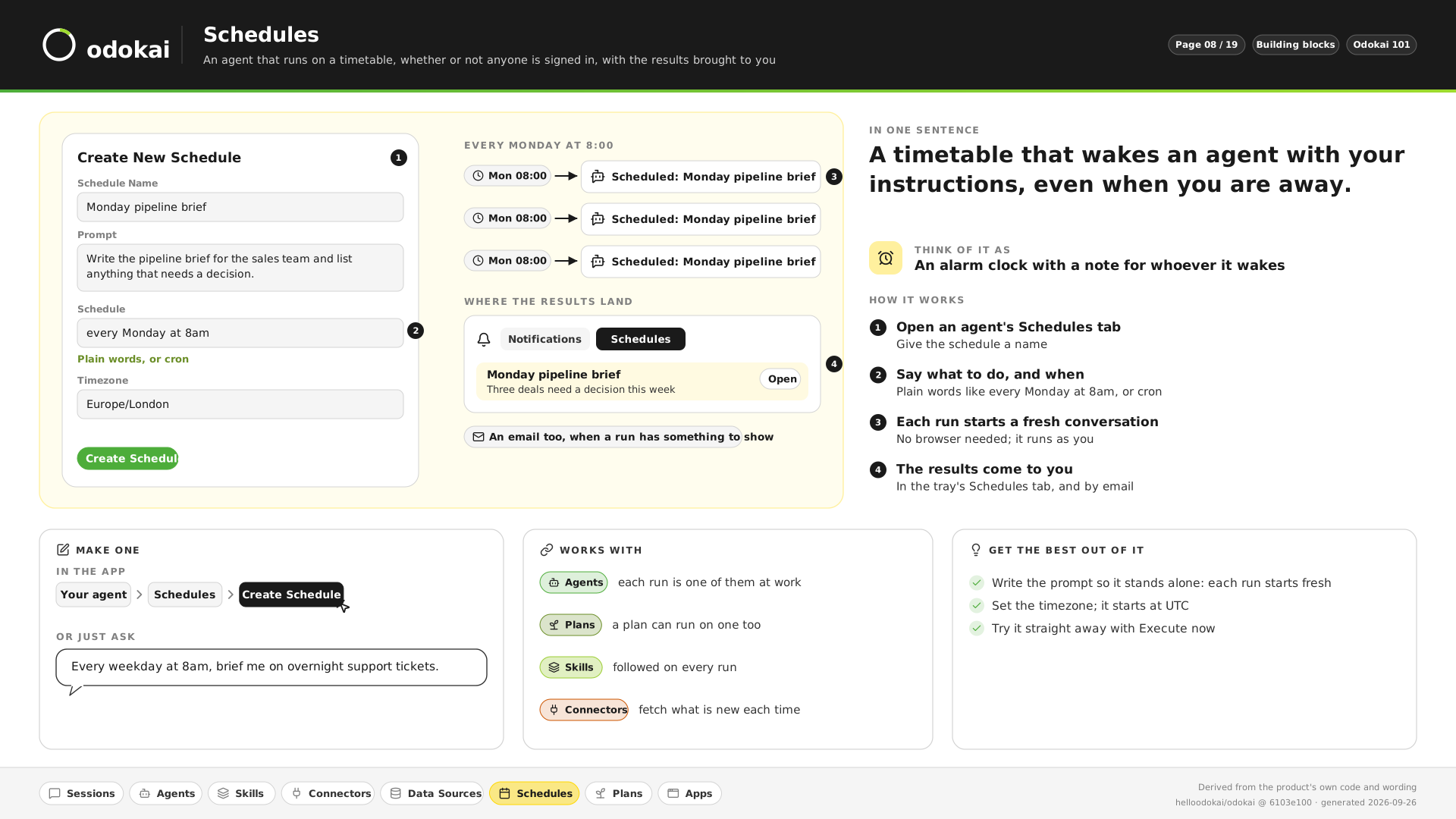
  6. Schedules

    A timetable that wakes an agent with your instructions, even when you are away, and brings you the results.

    “Every weekday at 8am, brief me on overnight support tickets.”

    See it in pictures
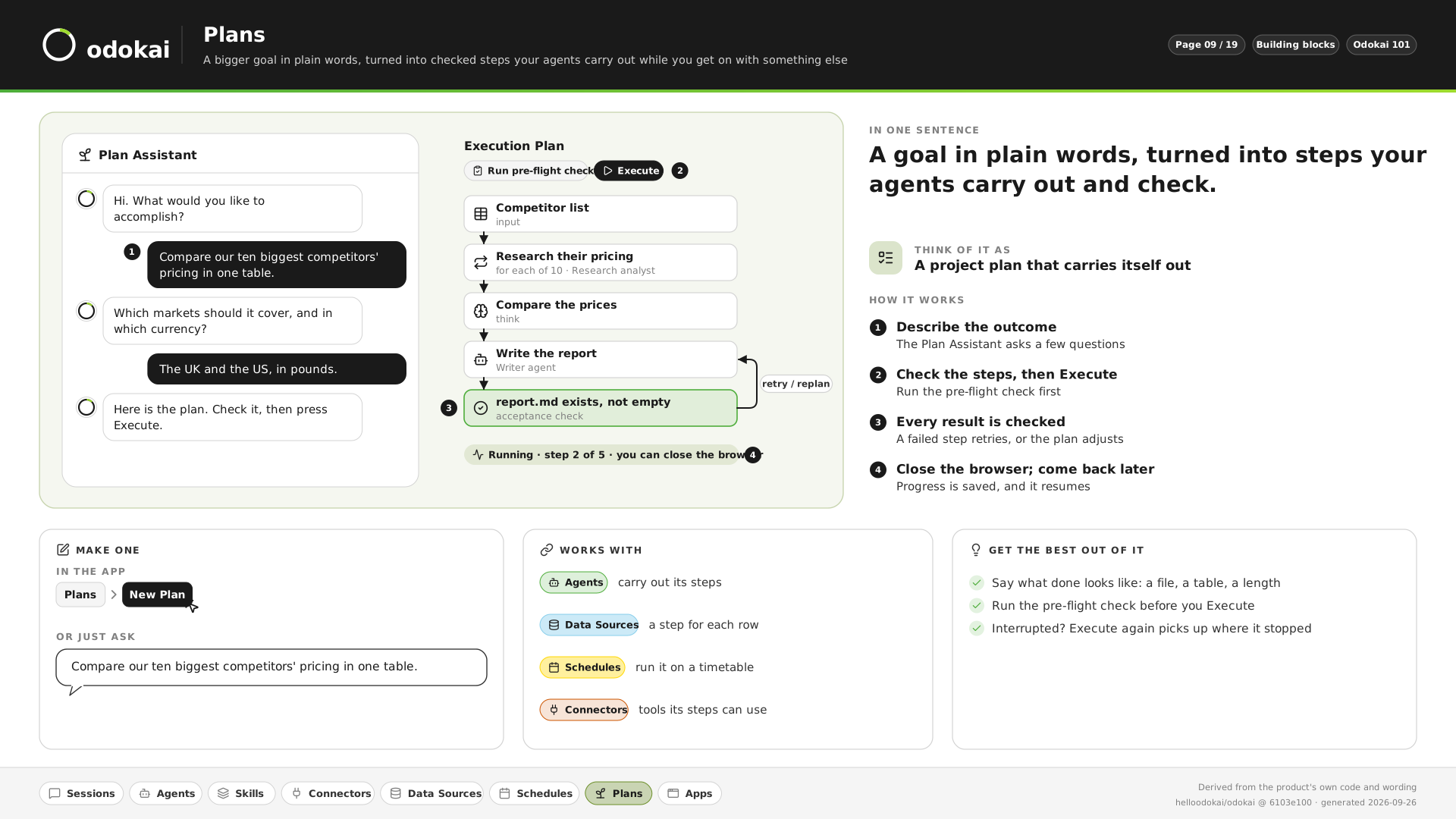
  7. Plans

    A goal in plain words, turned into checked steps your agents carry out, even with the browser closed.

    “Compare our ten biggest competitors’ pricing in one table.”

    See it in pictures
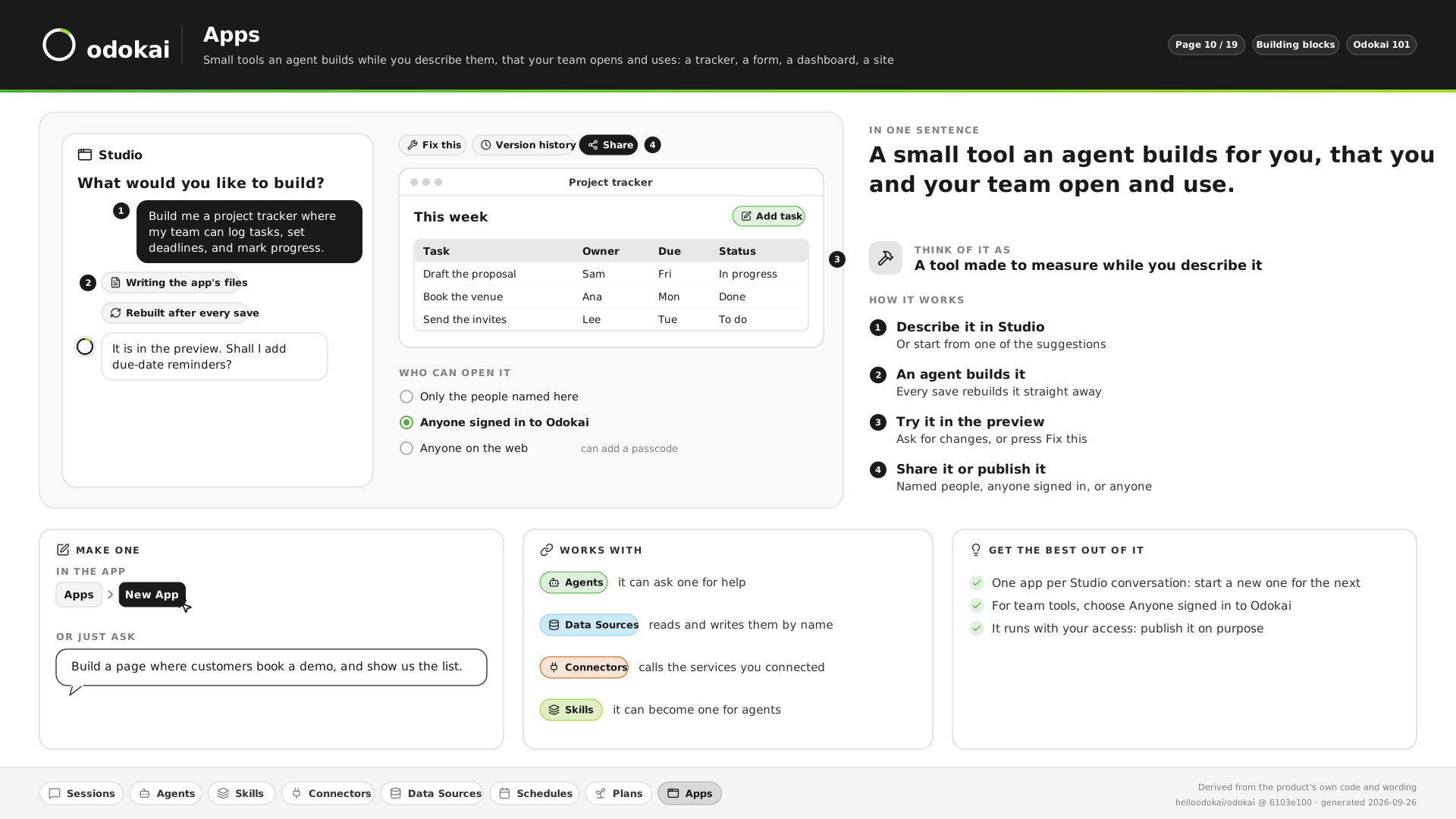
  8. Apps

    A tracker, a form, a dashboard or a site, built by an agent while you describe it.

    “Build a page where customers book a demo, and show us the list.”

    See it in pictures

Not sure which you need? Describe the problem. Odokai checks what you already have, connects what is missing, and builds the rest.

Example 1

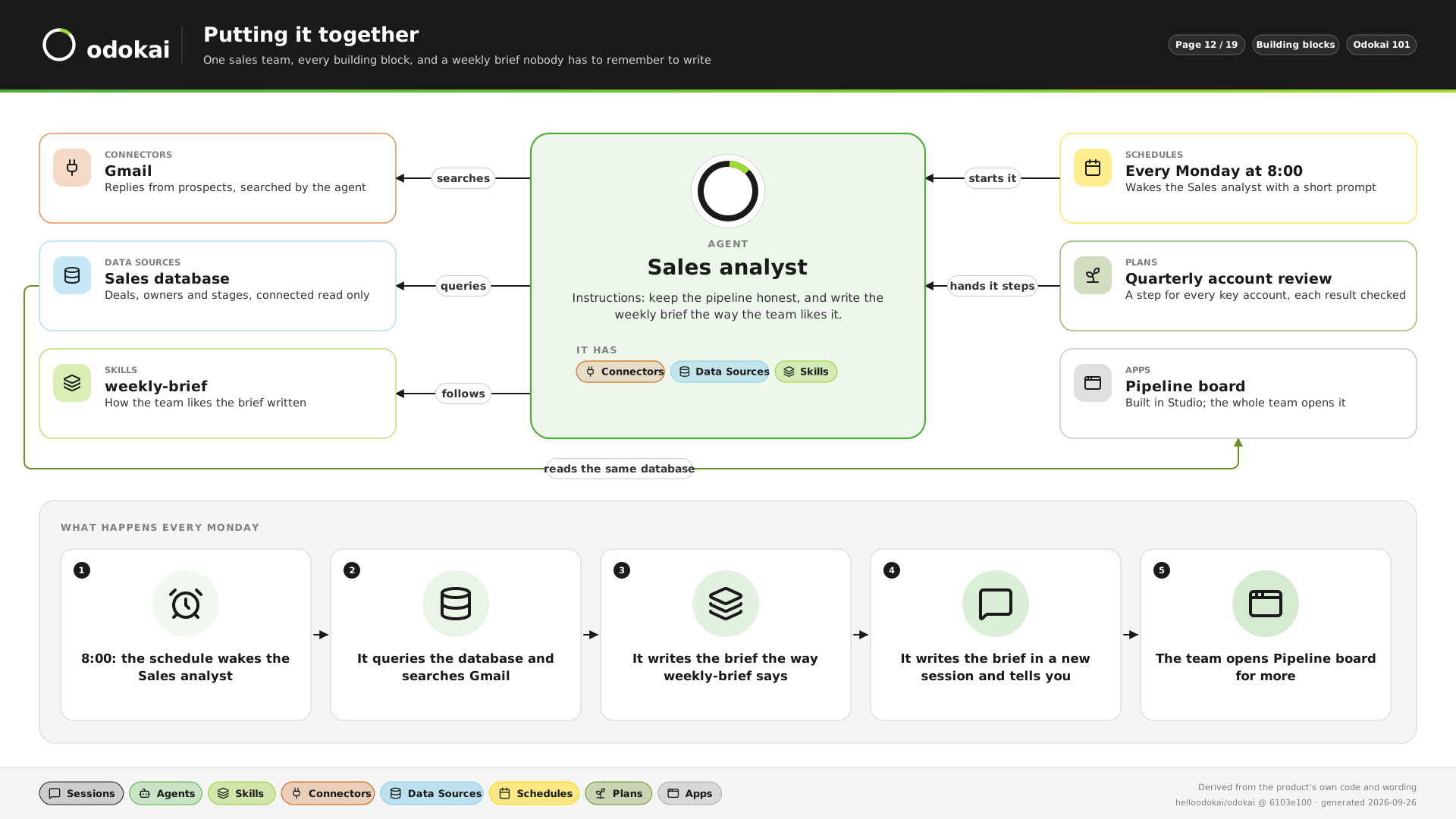
The Monday brief nobody has to remember to write.

  1. 08:00. A schedule wakes the Sales analyst agent.
  2. It queries the sales database and searches Gmail for replies from prospects.
  3. It writes the brief the way the team’s weekly-brief skill says.
  4. The brief lands in a new session, and you are told.
  5. The team opens the Pipeline board app for more.
A worked example: a Sales analyst agent with the Gmail connector, a read-only sales database and the weekly-brief skill, started by a schedule every Monday at 8:00, with a quarterly plan and a Pipeline board app reading the same database.
Example 2 · Legal

A first read of every contract before the lawyer opens it.

  1. On arrival. A contract lands in the matters inbox. A classifier recognises it and wakes the Contract review agent.
  2. It reads the contract against the firm’s playbook skill and scores each risky clause.
  3. Parties, key dates and figures go into the Matters table.
  4. Client details are redacted before any model sees them, and the summary lands in a session for the fee earner.
  5. Nothing goes to the client. The lawyer decides what to negotiate.
  • Classifier
  • Contract review agent
  • Playbook skill
  • Matters table
  • Redaction
Example 3 · Financial

Month-end commentary, drafted on the 5th.

  1. 07:00 on the 5th. A schedule starts the month-end workflow, one step per client.
  2. The Finance analyst agent reads the trial balance through the accounting connector, read-only.
  3. It drafts the commentary in the house-style skill, and marks any movement the figures cannot explain.
  4. Each draft waits for an accountant to approve it before it goes anywhere.
  5. A close tracker app shows which clients are drafted, approved and sent.
  • Schedule
  • Workflow
  • Accounting connector
  • House-style skill
  • Approval
  • Tracker app
Example 4 · Marketing

A campaign landing page from one brief.

  1. One message. A marketer describes the campaign to the Marketing agent.
  2. It writes the copy and makes the images to the brand guidelines skill.
  3. It builds the page in App Studio, beside the conversation, and changes it when asked.
  4. Publishing waits for the marketing lead’s approval.
  5. Once it is live, the team sees how often the page is opened, without cookies or a tracker.
  • Marketing agent
  • Brand skill
  • App Studio
  • Approval
  • Share analytics
Example 5 · Business change

A new policy, rolled out and checked.

  1. One upload. The change team adds the new policy to the knowledge base.
  2. The Policy agent checks every procedure against it and lists what must change, each finding linked to its clause.
  3. It drafts the updated procedures and a staff FAQ in the change team’s format.
  4. Each procedure goes to its owner, who signs it off or sends it back.
  5. Staff ask questions and get answers that cite the new policy. A tracker app shows which teams have signed off.
  • Knowledge base
  • Policy agent
  • Approval
  • Tracker app
Why you’d want it

Why teams use it.

Most firms have recurring work: renewals, month-end commentary, the Friday update, supplier invoices. Agents do the gathering, drafting and checking. Your team reviews and decides.

See all ten jobs

Done before anyone asks

Schedules and plans run whether or not anyone is signed in. The brief is waiting at 8am; the packs are ready before the team arrives.

Your way, every time

Write how your team does a job once, as a skill. Every agent follows it, so the standard does not depend on who is in the office.

Inside rules you set

Agents ask before they act where you say they must, sensitive data follows rules your admin chooses, and every action leaves a record.

Knowledge that stays

Documents, policies and playbooks every agent can use and cite. What agents learn belongs to the business, so it stays when people leave.

Any model

Any provider with an OpenAI-compatible API, from fast and cheap to the most capable, chosen per task. Classifiers take the sorting and checking. Switch as better models arrive.

Apps as well as answers

Build internal tools in App Studio, such as a client portal or a compliance tracker, on your own data.

The second workflow

Later workflows reuse the first.

Everything we build lands on your instance of the Odokai platform. What the first build sets up, every later workflow reuses.

Agents

Built without engineers

Role-specific agents with their own prompts, models, tools and knowledge. Your operations lead can build one. It doesn't take a developer.

Knowledge

Answers from your own documents

Load contracts, policies and SOPs into knowledge bases. Agents answer with citations, grounded in your material rather than the open internet.

Creative studio

From brief to finished work

Give an agent a brief and get back the website, the imagery or the campaign draft. Built with live preview, your brand applied, ready to publish or embed.

Orchestration

Multi-step workflows, on schedule

Chain agents into workflows with branching and parallel steps. Run them on a schedule, a trigger or on demand, with the full run history kept.

Governance

Controls your compliance team will recognise

Role-based access, human approval gates on sensitive actions, model allowlists and routing rules, and an action-level audit trail.

Models

Every leading model, one login

Route each step to the model that suits it, and let classifiers take the sorting and checking. Upgrades reach your instance as they ship.

Run it shared and hosted by us, or dedicated in your AWS account or ours, managed or self-hosted. Your data and everything you build stay yours either way. See how the platform works, block by block.

In your control

Rules and records.

Every agent works inside your organisation, under rules a person sets, and leaves a record of what it did.

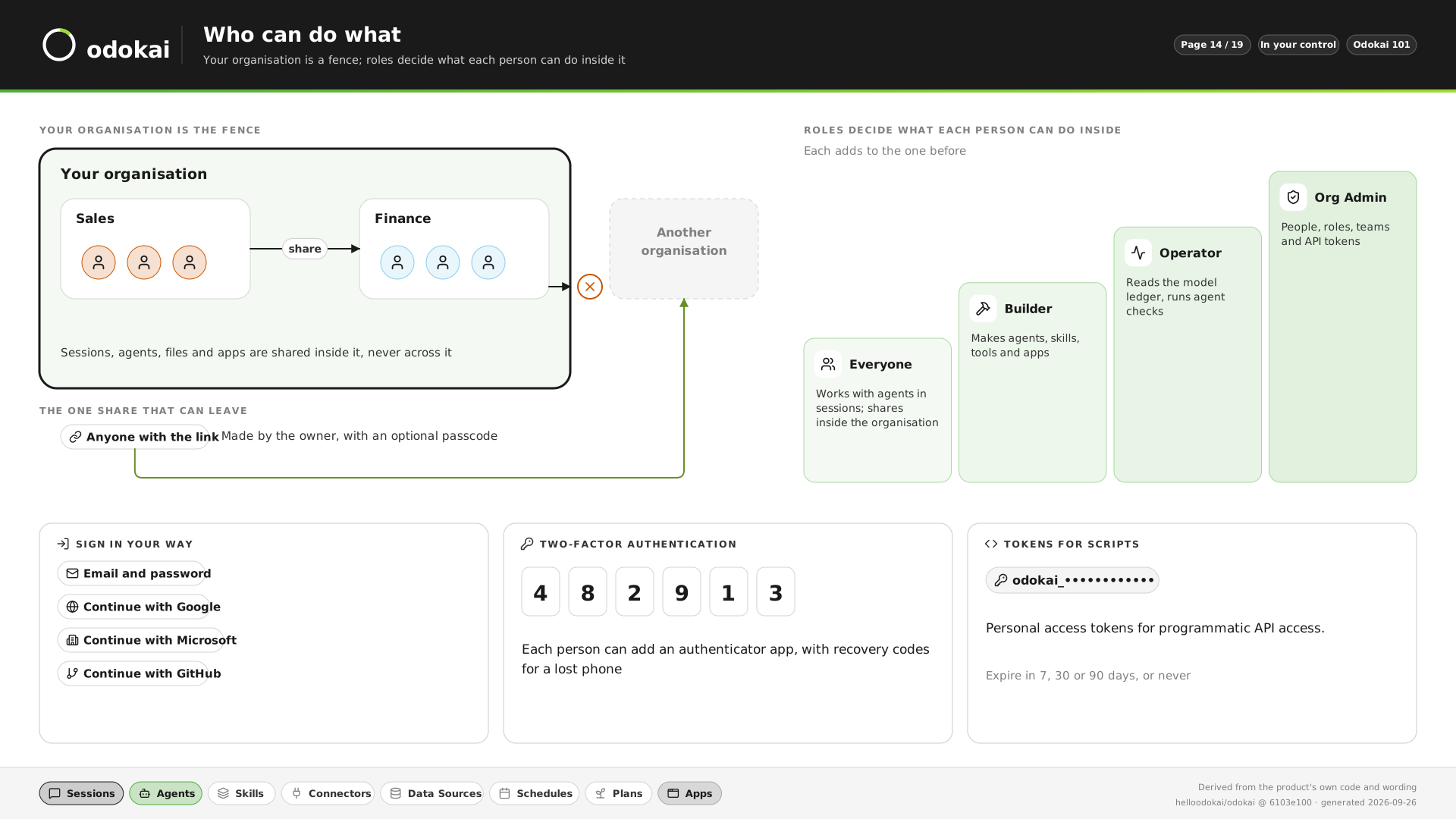
  • Who can do what

    Everything stays inside your organisation. Roles decide what each person can do there, and everyone can sign in with two-factor authentication.

    See it in pictures
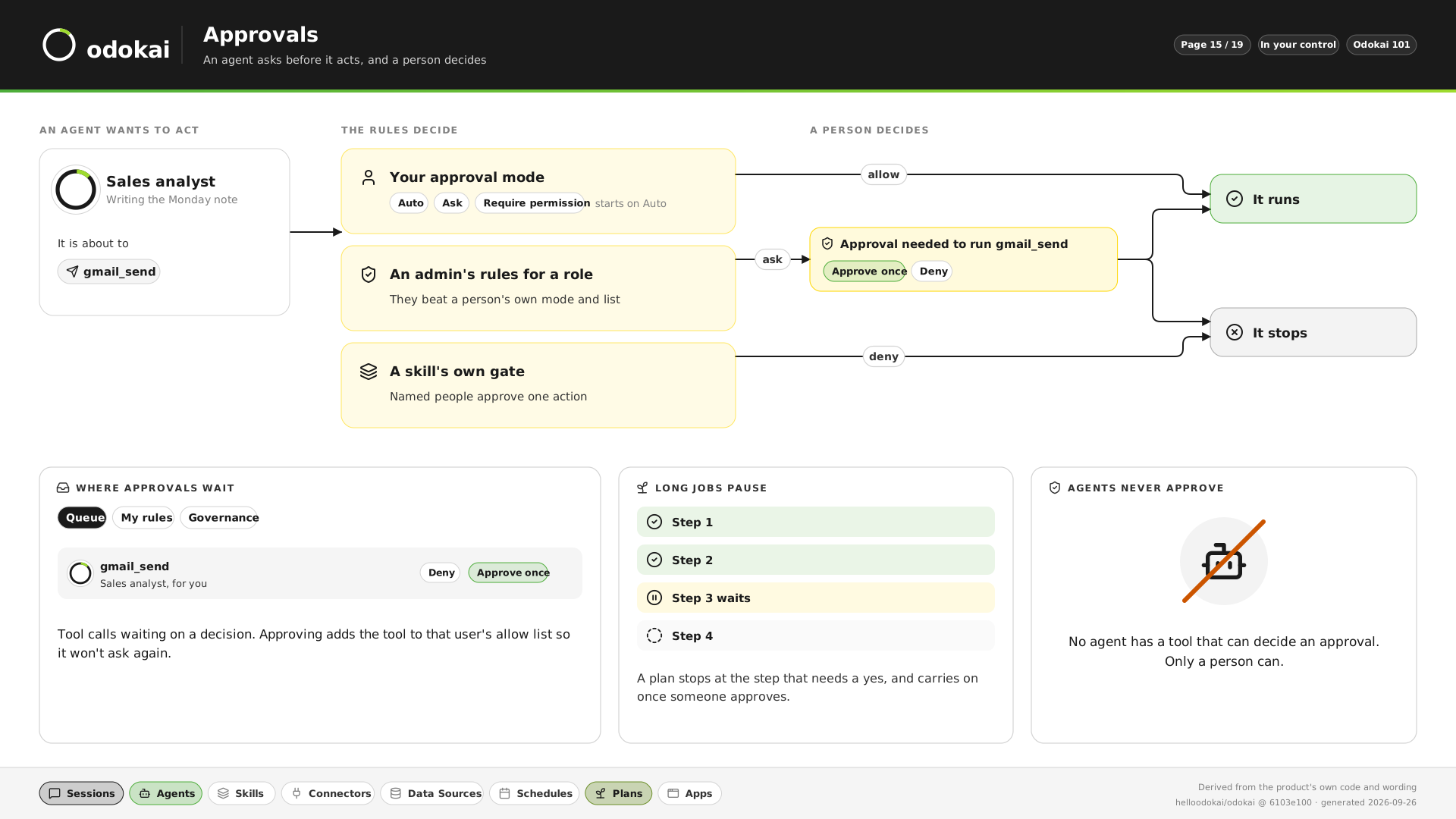
  • Approvals

    An agent asks before it acts, and a person decides. A plan pauses at the step that needs a yes. No agent can approve anything.

    See it in pictures
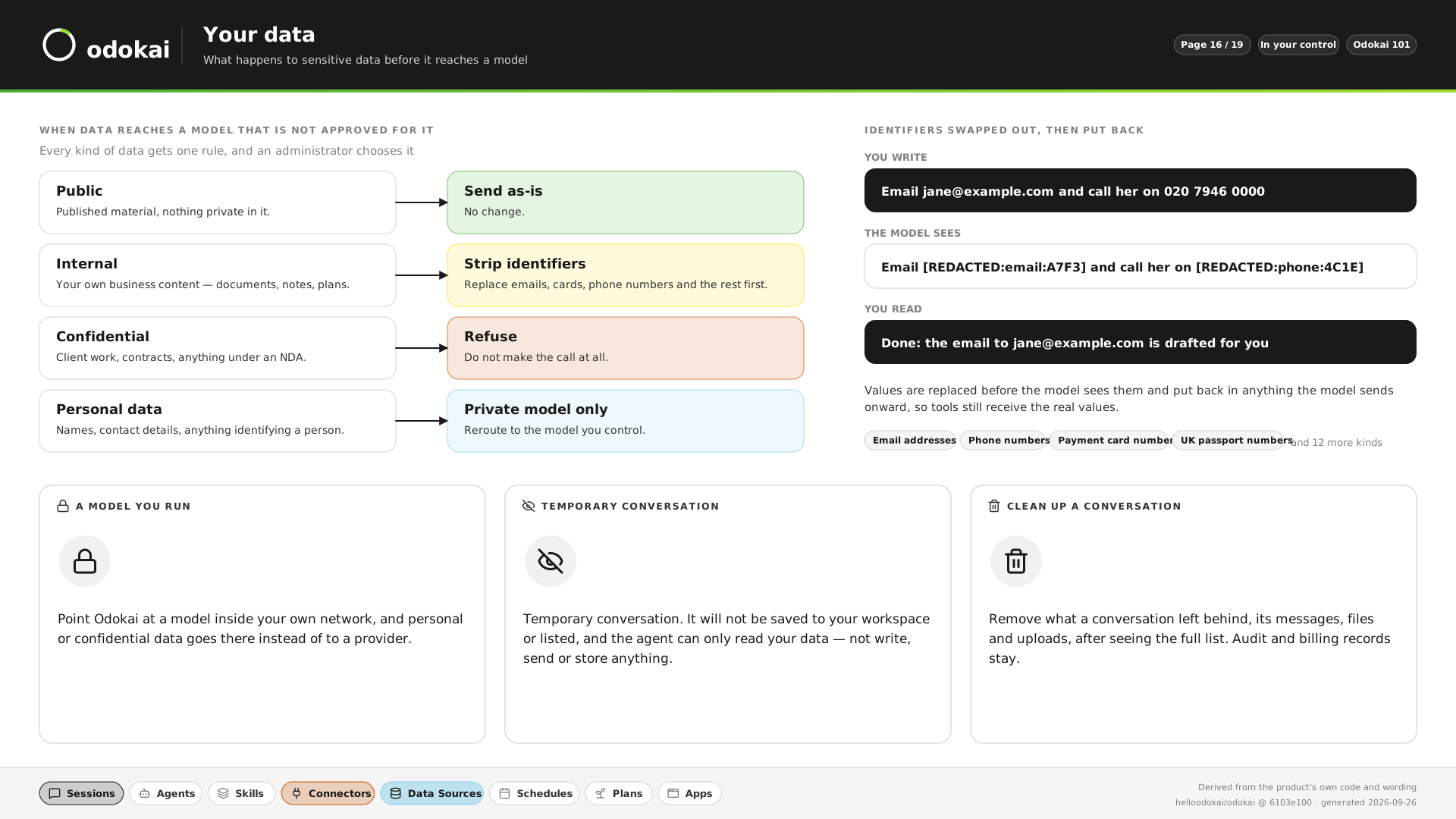
  • Your data

    One rule for each kind of data: send as-is, strip identifiers, private model only, or refuse. Names and numbers are swapped out before a model sees them, and put back after.

    See it in pictures
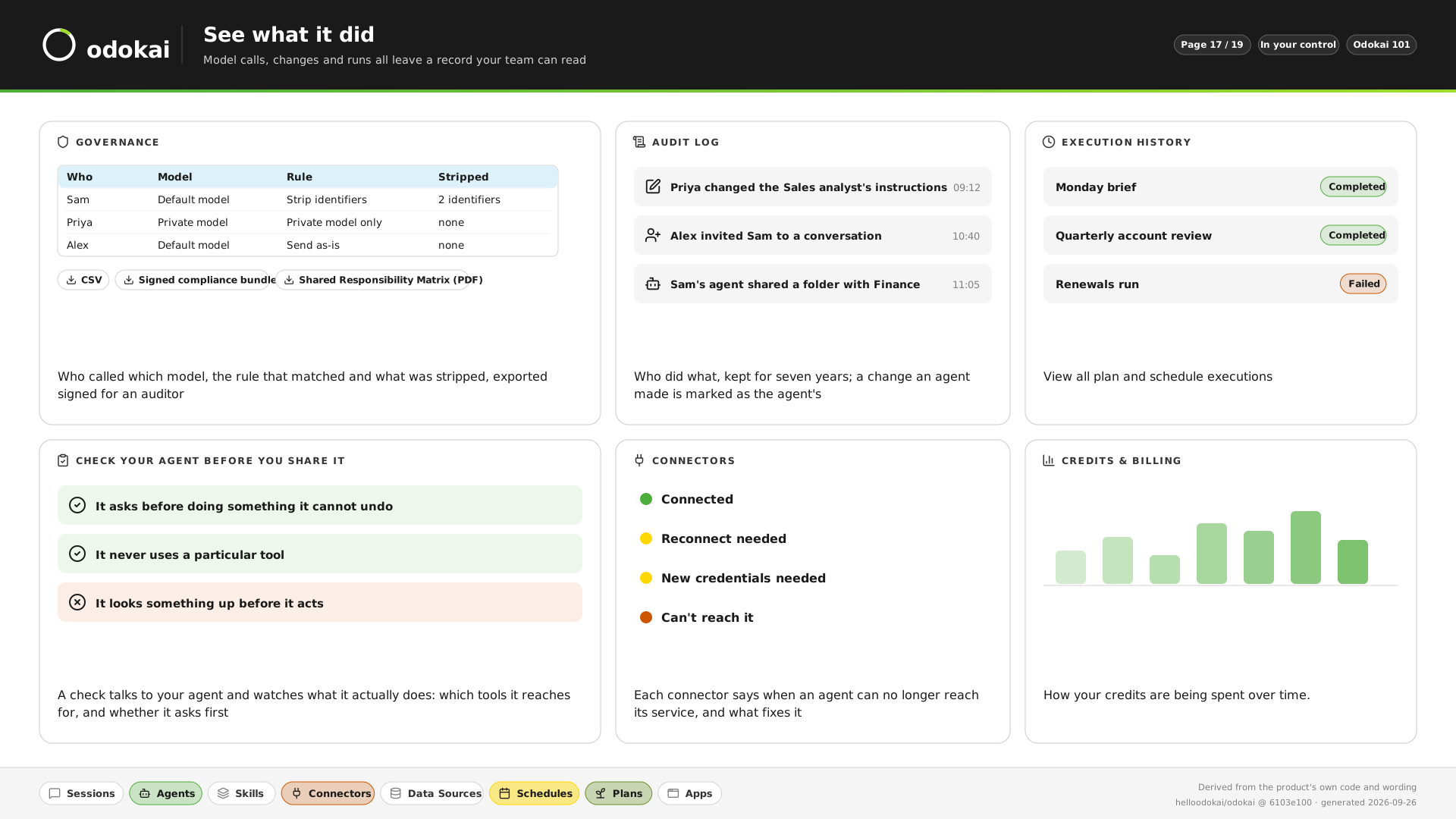
  • See what it did

    Who called which model, what was stripped, who changed what, and every scheduled run, kept and exportable for an auditor.

    See it in pictures
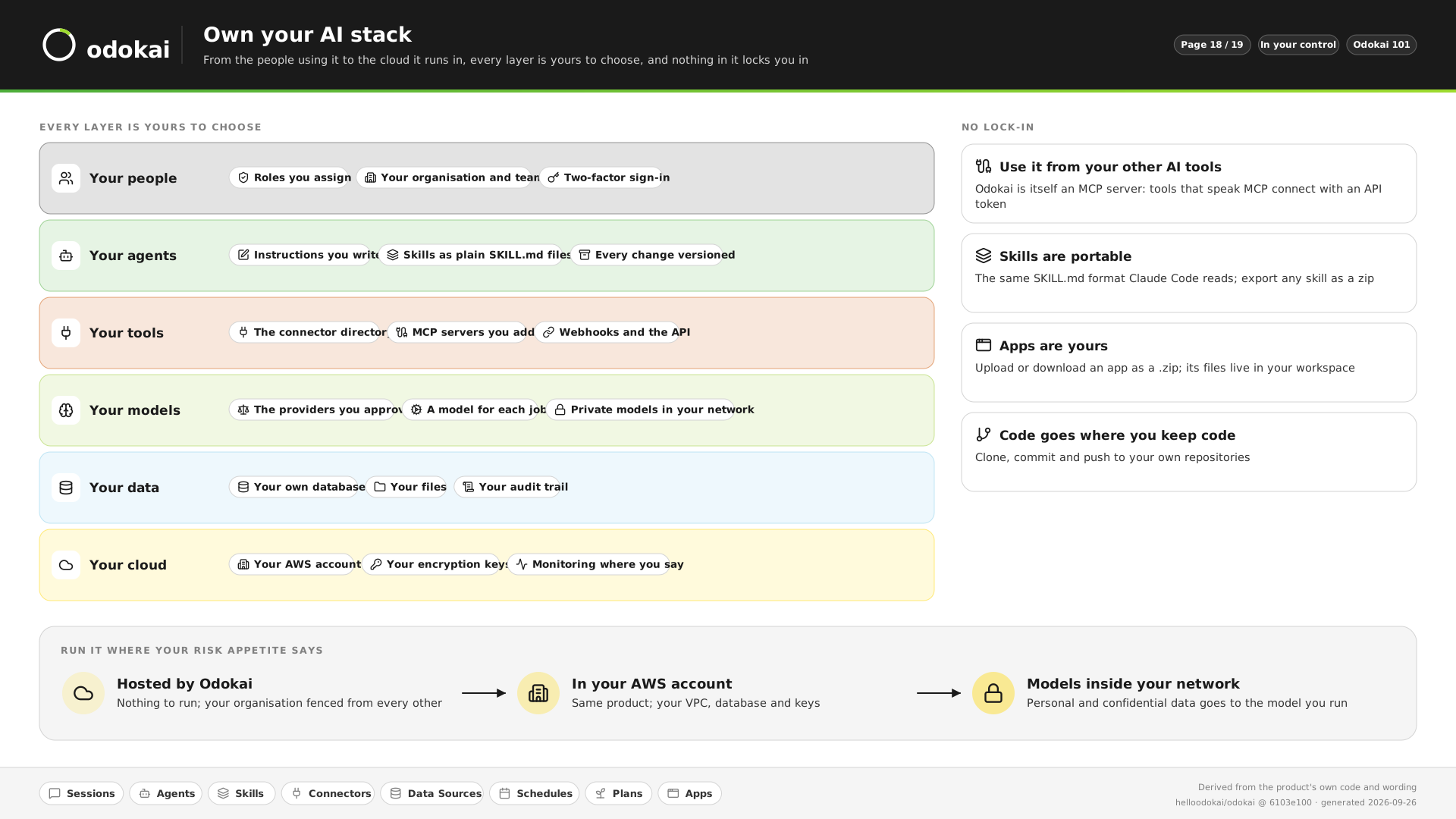
  • Own your AI stack

    Hosted by us, or in your own AWS account with your own keys and models. Skills and apps export as files, so you can take them with you.

    See it in pictures
  • The full picture

    How Odokai compares with ChatGPT Enterprise, Copilot and Claude on security and controls, and which gaps are still open.

    Read the comparison
Get started

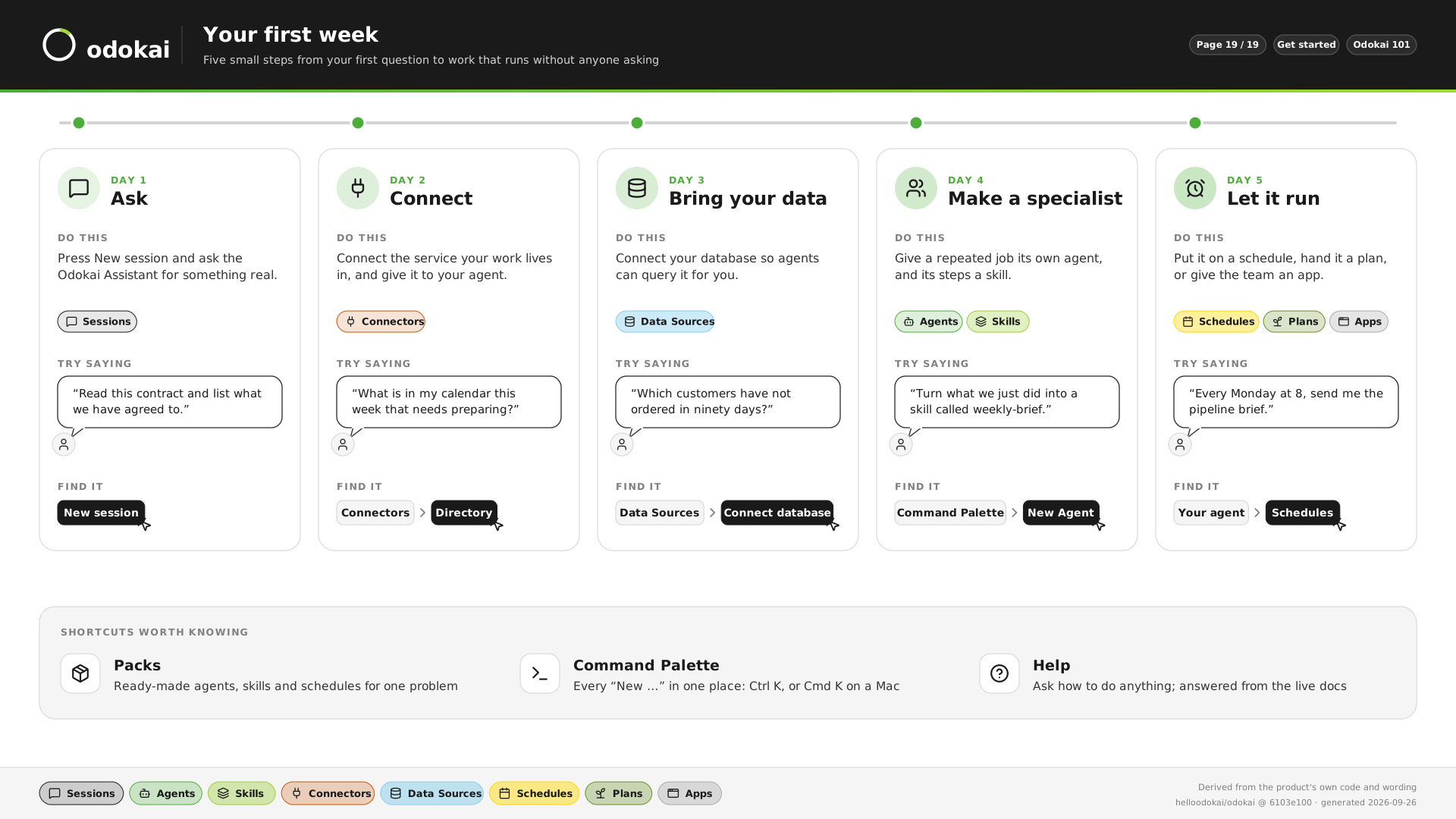
Your first week.

From your first question to work that runs without anyone asking.

  1. Day 1

    Ask

    Start a session and ask the Odokai Assistant for something real.

    “Read this contract and list what we have agreed to.”

  2. Day 2

    Connect

    Connect the service your work lives in, and give it to your agent.

    “What is in my calendar this week that needs preparing?”

  3. Day 3

    Bring your data

    Connect your database so agents can query it for you.

    “Which customers have not ordered in ninety days?”

  4. Day 4

    Make a specialist

    Give a repeated job its own agent, and its steps a skill.

    “Turn what we just did into a skill called weekly-brief.”

  5. Day 5

    Let it run

    Put it on a schedule, hand it a plan, or give the team an app.

    “Every Monday at 8, send me the pipeline brief.”

See it in pictures

We do day one with you. On a free 45-minute discovery call we build an agent for one of your jobs, live, on your own documents.

Book a discovery call
Take it with you

Downloads.

Two PDFs to pass round: Odokai 101, on the building blocks, the controls and a first week, and Odokai at work, on ten jobs agents can run for your team.

Open full size